🔴 Latest Update:
June 2026: KSKVKU Even Semester / Summer Examination Results 2026 are being declared on the official portal kskvku.digitaluniversity.ac. Students with SPID must check results through their student login. Students with PRN can check via “View Details” on the result page. This page is updated as soon as new results go live.
Krantiguru Shyamji Krishna Verma Kachchh University (KSKVKU), Bhuj, Gujarat has officially declared the KSKVKU Result 2026 for various undergraduate and postgraduate courses including BA, BSc, BCom, BCA, BBA, MA, MSc, M.Com, MBA, MCA, and more for both Even Semester (Summer) and Odd Semester (Winter) examinations. The university follows the CBCS (Choice Based Credit System) under NEP (National Education Policy) 2020 guidelines and uses a 10-point CGPA grading scale.
Students who appeared in any KSKVKU examination in 2026 can now check and download their result and marksheet through the official digital university portal kskvku.digitaluniversity.ac using their SPID (Student Permanent Identification Number) or PRN (Permanent Registration Number). On this page, you will find the complete course-wise result status, direct download links, step-by-step instructions for both SPID and PRN holders, CGPA details, revaluation process, and all important dates – everything in one place.
KSKVKU Result 2026 – Overview
| Details | Information |
|---|---|
| University Name | Krantiguru Shyamji Krishna Verma Kachchh University (KSKVKU) |
| Location | Bhuj, Kachchh District, Gujarat |
| Established | 2003 |
| Courses Covered | BA, BSc, BCom, BCA, BBA, MA, MSc, M.Com, MBA, MCA, B.Ed, LLB, Diploma |
| Exam System | CBCS (Semester) + Annual (NEP 2020) |
| Grading System | 10-Point CGPA Scale |
| Result Check Mode | Online |
| SPID Login Portal | kuerp.kskvku.ac.in |
| PRN Result Portal | kskvku.digitaluniversity.ac |
| Minimum Passing | 36%–40% (Theory + Internal, course-wise) |
| Revaluation Deadline | Within 15 days of result declaration |
KSKVKU Result 2026 Declared – Direct Download Links (All Courses)
| Course | Exam Type | Session | Download Link |
|---|---|---|---|
| BA (All Semesters) | Even Sem / Summer | 2025–26 | Check Results |
| BSc (All Semesters) | Even Sem / Summer | 2025–26 | Check Results |
| BCom (All Semesters) | Even Sem / Summer | 2025–26 | Check Results |
| BCA | Even Sem / Summer | 2025–26 | Check Results |
| BBA / BBM | Even Sem / Summer | 2025–26 | Check Results |
| MA (All Subjects) | Even Sem / Summer | 2025–26 | Check Results |
| MSc (All Subjects) | Even Sem / Summer | 2025–26 | Check Results |
| M.Com | Even Sem / Summer | 2025–26 | Check Results |
| MBA / PGDM | Even Sem / Summer | 2025–26 | Check Results |
| MCA | Even Sem / Summer | 2025–26 | Check Results |
| M.Ed / B.Ed | As per schedule | 2025–26 | Check Results |
| LLB / Law | As per schedule | 2025–26 | Check Results |
| Diploma / Adv. Diploma | As per schedule | 2025–26 | Check Results |
| Odd Sem Results (Winter) | Odd Sem / Winter | 2025–26 | Check Results |
Important: Students who have SPID must check their result only through their student login at kuerp.kskvku.ac.in. Students with PRN can check using the “View Details” option on the result portal.
Krantiguru Shyamji Krishna Verma Kachchh University result 2026
| Date | Result Notification | Check Result |
|---|---|---|
| 09 June 2026 | Bachelor of Visual Arts (June 2024) Semester II Result | Check Result |
| 10 June 2026 | Master of Law (June 2022) Semester II Result | Check Result |
| 10 June 2026 | B.Com Regular NEP (June 2023) Semester II Result | Check Result |
| 10 June 2026 | B.A. External (June 2016) Semester II Result | Check Result |
| 10 June 2026 | B.A. External (June 2016) Semester IV Result | Check Result |
| 11 June 2026 | Bachelor of Visual Arts (June 2024) Semester IV Result | Check Result |
| 11 June 2026 | MBA Integrated NEP (June 2023) Semester II Result | Check Result |
| 11 June 2026 | MBA Integrated NEP (June 2023) Semester IV Result | Check Result |
| 11 June 2026 | MBA Integrated (June 2016) Semester II Result | Check Result |
| 11 June 2026 | MBA Integrated (June 2016) Semester VIII Result | Check Result |
| 11 June 2026 | M.Sc. CA & IT Integrated NEP (June 2023) Semester II Result | Check Result |
| 11 June 2026 | M.Sc. CA & IT Integrated NEP (June 2023) Semester IV Result | Check Result |
| 11 June 2026 | M.Sc. IT (June 2016) Semester II Result | Check Result |
How to Check KSKVKU Result 2026 with SPID (Student Login)
To check your KSKVKU Bhuj result 2026 for the year 2026 you will need to use your SPID, which’s your Student Permanent Identification Number. This is a 16-digit number that you can find on your KSKVKU Admit Card and Registration Slip.
If you have your SPID here is what you need to do: how to check KSKVKU result 2026 with SPID PRN
- Open a browser and go to the KSKVKU ERP portal the address is kuerp.kskvku.ac.in.
- On the homepage click on the “Student Login” option.
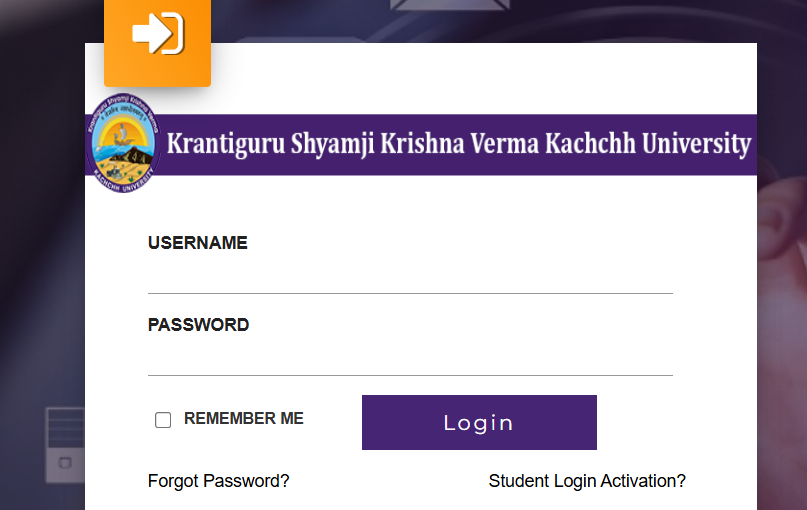
- When you are logging in for the time you have to activate your account.
- To do this you need to click on “Activate Student Login” then you enter your SPID it is the 16-digit number from your admit card.
- Next you set your password. You confirm it using the OTP that is sent to your mobile number.
- After you activate your account you can log in using your SPID as your username and the password you just set.
- Once you are logged in you go to the “Result” or “Examination” section this is in your student dashboard.
- Here you select your Course, your Semester and your Exam Session, which is Even 2025-26, for KSKVKU result 2026.
- Your KSKVKU result will be displayed so you can see your grades for each subject and your CGPA.
- Make sure to check everything
- You can also download your result as a PDF and save it so you have it for later.
If you forgot your SPID password you can do something about it. Use the Forgot Password link on the ERP portal to start the process. Remember that your SPID is like your username. So make sure your mobile number is up, to date because you will get a code called OTP on your mobile to reset your SPID password.
Also Read: HNGU Result 2026 OUT – Check @ngu.ac.in Marksheet, BA, BSc, BCom, MA, MSc, BCA, BBA & All Courses
How to Check KSKVKU Result 2026 with PRN (View Details)
To check the KSKVKU Result 2026 with your PRN you need to follow some steps.
- First you have to go to the KSKVKU Digital University website, which is kskvku.digitaluniversity.ac/result.
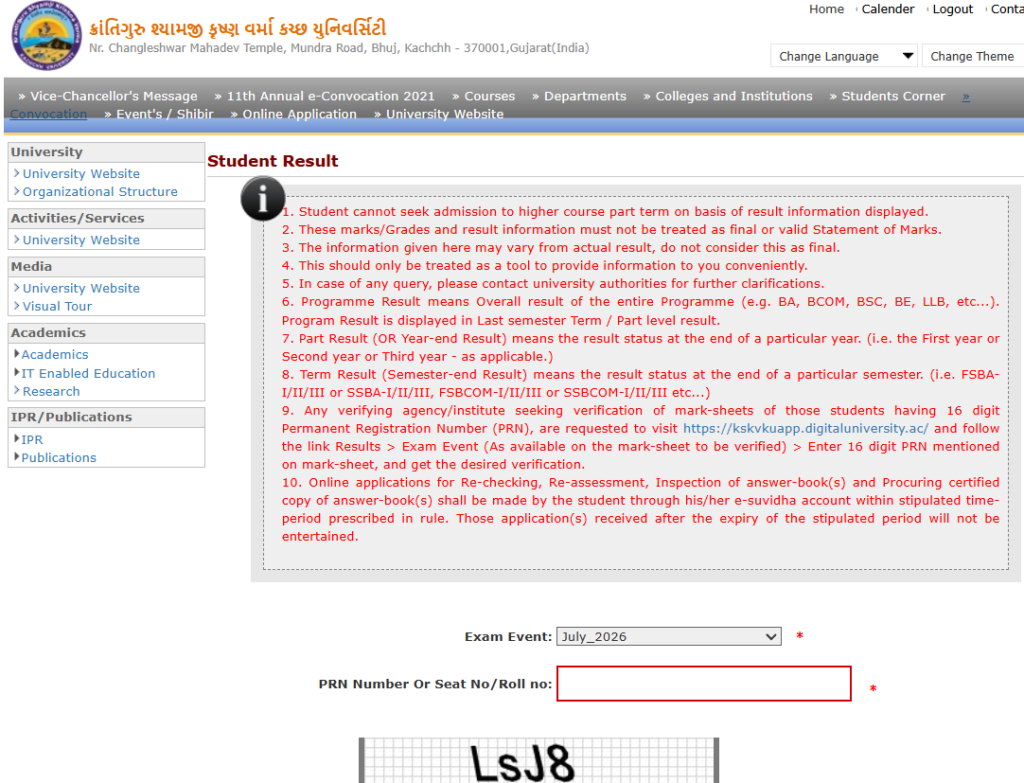
This is where you will find your KSKVKU Result 2026.
Here is what you have to do:
- Visit the KSKVKU Digital University portal.
- On the KSKVKU Result 2026 page you will see a “View Details” option.
You have to click on this to check your KSKVKU Result 2026.
- Now you have to enter your PRN, which’s your Permanent Registration Number.
- After that you have to enter your Date of Birth and some other details that they ask for.
- Then you click on “Submit” or “View Result” to see your KSKVKU Result 2026.
- Your KSKVKU Result 2026 will be on the screen now.
Check everything carefully. Your name, the course you are doing the marks you got in each subject and your CGPA, for KSKVKU Result 2026.
- Finally you should. Print your KSKVKU Result 2026 so you can keep it for later.
Note: PRN holders cannot use the SPID student login — use only the “View Details” method described above.
KSKVKU CGPA Grading System & Percentage Conversion 2026
KSKVKU follows the 10-point CGPA grading scale under CBCS and NEP 2020 guidelines.
CGPA to Percentage Conversion
KSKVKU uses this official formula:
Percentage = CGPA × 9.5
| CGPA | Equivalent Percentage |
|---|---|
| 10.0 | 95% |
| 9.0 | 85.5% |
| 8.0 | 76% |
| 7.0 | 66.5% |
| 6.0 | 57% |
| 5.0 | 47.5% |
| 4.0 | 38% |
Minimum Passing Criteria
- Minimum 36% to 40% (depending on the course) is required in both internal assessment and external (semester-end) examination separately to be declared “Pass.”
- Students failing in any one subject must appear for the Supplementary / Remedial Examination notified by the university.
KSKVKU Revaluation 2026. How to Apply Online
You can apply for KSKVKU Revaluation 2026 if you are not happy with your KSKVKU Result 2026.
Here are the details about KSKVKU Revaluation:
- You have to apply within 15 days of the KSKVKU Result declaration date.
- KSKVKU Revaluation and rechecking are for theory exams.
- You cannot apply for exam revaluation.
- You can apply for KSKVKU Revaluation online using your student login.
Steps to Apply for KSKVKU Revaluation 2026:
- Go to kuerp.kskvku.ac.in. Log in with your SPID.
- Find the KSKVKU Revaluation or Online Exam Services section.
- Choose the subjects you want KSKVKU Revaluation, for.
- Pay the KSKVKU Revaluation fee online.
- Submit your KSKVKU Revaluation form. Save the receipt.
You should remember that the deadline is, in 15 days. The university will not accept any applications that’re late. So make sure you do it on time. Join our Telegram Channel to get alerts when the revaluation form is open.
If you want to see your answer sheets you can use the RTI rules. The RTI rules say that you can ask the university for a copy of your answer sheets if you need them.
Details on KSKVKU Marksheet 2026
When you download your KSKVKU result 2026, the online marksheet will contain:
- Student’s Full Name
- Father’s / Mother’s Name
- SPID / PRN / Enrolment Number
- Course Name and Semester / Year
- Subject-wise Internal Marks + External Marks
- Subject-wise Grade and Grade Points
- SGPA (Semester Grade Point Average)
- CGPA (Cumulative Grade Point Average)
- Pass / Fail Status
- University Seal and Controller of Examinations’ signature
If you find any error in name, marks, or other details — report it immediately to the Controller of Examinations, KSKVKU, Bhuj or through your affiliated college’s examination cell.
KSKVKU Result 2026 – Important Dates
| Event | Date |
|---|---|
| Odd Semester (Winter) Exams | October–December 2025 |
| Odd Semester Results Declared | January 2026 (First / Second Week) |
| Even Semester (Summer) Exams | March–May 2026 |
| Even Semester Results Declared | June–July 2026 (Ongoing) |
| Revaluation / Reassessment Window | Within 15 days of each result |
| Supplementary / Remedial Exam | After result declaration (watch kskvku.ac.in) |
| Next Admission Cycle (2026-27) | Check kskvku.digitaluniversity.ac |
Join Our Social Media Channels
| Platform | Action |
|---|---|
| Join Our WhatsApp Channel | Follow Now |
| Join Our Telegram Channel | Follow Now |
| IMPORTANT LINKS | |
| Check how to check KSKVKU result 2026 with SPID PRN Online | Check Results |
| KSKVKU Result 2026 with PRN | Click Here |
| Official Website | KSKVKU Website |
| Homepage | Click Here |
FAQ: KSKVKU Result 2026
Is KSKVKU Result 2026 declared?
Yes. KSKVKU has declared the Even Semester results for 2026. These results are for students who are doing BA, BSc, BCom, BCA, BBA, MA, MSc, MCom, MBA, MCA and other courses. You can find the KSKVKU Result 2026 at kskvku.digitaluniversity.ac. They are putting the results on the website in June and July 2026.
How to check KSKVKU result 2026 with SPID at kskvku.digitaluniversity.ac?
To check your KSKVKU result 2026 with SPID you need to log in to the ERP portal. The ERP portal is at kuerp.kskvku.ac.in. Use your SPID as the username and the password you set. If you are logging in for the time you need to activate your account first.
How to check KSKVKU result 2026 with PRN?
If you want to check your KSKVKU result 2026 with PRN go to kskvku.digitaluniversity.ac/result. Click on “View Details”. Enter your PRN and Date of Birth. Then you can see your result.
What is SPID in KSKVKU?
SPID is a number that KSKVKU gives to each student. It is called the Student Permanent Identification Number. This number is 16 digits long. Is on your KSKVKU Admit Card and Registration Slip. You use this SPID to log in to the universitys ERP student login portal.
What is the KSKVKU CGPA to percentage formula?
KSKVKU uses a formula to change CGPA to percentage. The formula is: Percentage = CGPA multiplied by 9.5. For example if your CGPA is 7.0 your percentage is 66.5%.
What is the minimum passing marks in KSKVKU?
To pass in KSKVKU you need to get least 36% to 40% in both the internal assessment and the external semester-end examination. The percentage you need can be different depending on the course you are doing.
How to apply for KSKVKU revaluation 2026?
If you want to apply for KSKVKU revaluation 2026 you need to log in to your student account at kuerp.kskvku.ac.in. Then go to the Revaluation/Reassessment section choose the subject you want to revaluate pay the fee and submit it. You need to do this within 15 days of the result being declared. You can only revaluate theory subjects, not practicals.
What is the full form of KSKVKU?
KSKVKU is a university in India. The full form of KSKVKU is Krantiguru Shyamji Krishna Verma Kachchh University. This university is in Bhuj, Kachchh, Gujarat. It was started in 2003 by the Government of Gujarat.
When is the KSKVKU Odd Semester Result 2026 declared?
The KSKVKU Odd Semester results for 2026 are usually declared in the second week of January. This is after the October, to December examination.
Where can I get the KSKVKU marksheet?
The original marksheet is made by KSKVKU. Given to your college. You can get it from your college examination section. They will tell you when the marksheet is ready.